AnywhereScanner
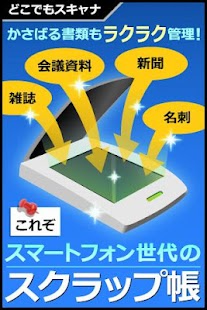
The App can scan documents with camera seen in work or life.
e.g.) Newspapers and Magazines, Receipts, Instructions, Business cards, Notes, Coupons, Posters.
This is 'AnywhereScanner'.
After you take the document to want to be saved, you crop unnecessary parts by copping function, and 'AnywhereScanner' run Image clearing automatically because characters are more visible.
You can immediately read databasing image files at any time, so the app manage it by tagging.
It is easy to organize image files by adding tags as you like, even when there is a lot of it.
Important image files can send as e-mail attachment,and upload the Cloud Storage Service, for example Dropbox.
<Main function>●Camera Take with camera of Android device.
Take with Auto Focus.
●Trimming If there is an unnecessary part of captured image, crop it.
●Clear Image After input the necessary documents into Android device, clear it.
If you take in the dark, characters are more visible.
●Manage Image Tag image and jot it, give the title it to manage captured documents.
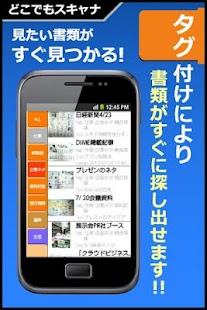
●Tags This function is used to help locate an documents.
Tap tab of tags on the left, so show the list of only selected images tagged.
As a result, be easy to search desired image.
●Manage List You can sort the list or delete unnecessary documents.
<Supported OS> Android OS version 2.2 or higher<Validated Models> GalaxyS2(SC-02C)、Xperia arco(IS11S)、Xperia arc(SO-01C)、Desire(X06HT)、IS05<Precautions> The copyright for the photos and images within the application (AnywhereScanner) belongs to Atlas Co., Ltd.
This application handles photo images and thus uses a large amount of memory.In some devices where the available memory is low, this application may run out of memory whilst processing the photos and may be unable to continue.
In this situation, the application displays a dialogue box notifying you that there is insufficient memory.
Normally you will be able to press the button for closing the application so that once the application is shutdown then the memory is freed up again.
Please note that some devices may not be able to restore its memory after closing the application.
About AnywhereScanner
- Package name (App ID)
- jp.atlas.anywherescanner
- Available on
- Google Play
- Price
- Free
- Version
- v1.7.6
- Developer
- GRYMALA
Looking for the AnywhereScanner APK?
The safest way to get AnywhereScanner (jp.atlas.anywherescanner) on your Android device is to install it directly from Google Play — you'll always get the latest official version, automatic updates, and no risk of modified or infected APK files from third-party sites.
Gaming Features
Enjoy immersive gaming experience with various game modes.
Camera Features
Advanced camera features with editing capabilities.
Shopping Features
Shop online and find the best deals.
See AnywhereScanner in Action

Frequently Asked Questions
Is AnywhereScanner free?
Yes, AnywhereScanner is free to download and install on Android through Google Play.
How do I install AnywhereScanner on Android?
Open Google Play on your Android phone or tablet, search for AnywhereScanner by GRYMALA or tap the Google Play button on this page, then tap Install. The app downloads and installs automatically.
What is jp.atlas.anywherescanner?
jp.atlas.anywherescanner is the App ID (package name) of AnywhereScanner on Google Play. Every Android app has a unique package name, and it is the safest way to verify you are installing the official app.
Is AnywhereScanner safe to download?
Installing AnywhereScanner from Google Play is the safest option: you get the official version published by GRYMALA, verified by Google Play Protect, with automatic updates. Avoid APK files from unofficial third-party sites.
Get AnywhereScanner Today
AnywhereScanner for Android — free download on Google Play.
Compatible with Android phones and tablets — available on Google Play.
Ask AI about this app
Get instant answers about features, tips and more from popular AI assistants.